HTML5 第二天
一、rotate
2d旋转指的是让元素在2维平面内顺时针旋转或者逆时针旋转
使用步骤:
- 给元素添加转换属性
transform - 属性值为
rotate(角度)如transform:rotate(30deg)顺时针方向旋转30度
div{ transform: rotate(0deg);}二、三角
- 代码演示
二、设置元素旋转中心点(transform-origin)
transform-origin基础语法xxxxxxxxxxtransform-origin: x y;重要知识点
- 注意后面的参数 x 和 y 用空格隔开
- x y 默认旋转的中心点是元素的中心 (50% 50%),等价于
centercenter - 还可以给 x y 设置像素或者方位名词(
top、bottom、left、right、center)
三、旋转中心案例
- 代码演示
四、2D 转换之 scale
scale的作用- 用来控制元素的放大与缩小
语法
xxxxxxxxxxtransform: scale(x, y)知识要点
- 注意,x 与 y 之间使用逗号进行分隔
transform: scale(1, 1): 宽高都放大一倍,相当于没有放大transform: scale(2, 2): 宽和高都放大了二倍transform: scale(2): 如果只写了一个参数,第二个参数就和第一个参数一致transform:scale(0.5, 0.5): 缩小scale最大的优势:可以设置转换中心点缩放,默认以中心点缩放,而且不影响其他盒子
代码演示
xxxxxxxxxxdiv:hover {/* 注意,数字是倍数的含义,所以不需要加单位 *//* transform: scale(2, 2) *//* 实现等比缩放,同时修改宽与高 *//* transform: scale(2) *//* 小于 1 就等于缩放*/transform: scale(0.5, 0.5)}
五、图片放大案例
- 代码演示
六、分页按钮案例
- 代码演示
七、 2D 转换综合写法以及顺序问题
知识要点
- 同时使用多个转换,其格式为
transform: translate() rotate() scale() - 顺序会影响到转换的效果(先旋转会改变坐标轴方向)
- 但我们同时有位置或者其他属性的时候,要将位移放到最前面
- 同时使用多个转换,其格式为
代码演示
xxxxxxxxxxdiv:hover {transform: translate(200px, 0) rotate(360deg) scale(1.2)}
八、 动画(animation)
什么是动画
- 动画是
CSS3中最具颠覆性的特征之一,可通过设置多个节点来精确的控制一个或者一组动画,从而实现复杂的动画效果
- 动画是
动画的基本使用
- 先定义动画
- 在调用定义好的动画
语法格式(定义动画)
xxxxxxxxxx@keyframes 动画名称 {0% {width: 100px;}100% {width: 200px}}
语法格式(使用动画)
xxxxxxxxxxdiv {/* 调用动画 */animation-name: 动画名称;/* 持续时间 */animation-duration: 持续时间;}
动画序列
- 0% 是动画的开始,100 % 是动画的完成,这样的规则就是动画序列
- 在 @keyframs 中规定某项 CSS 样式,就由创建当前样式逐渐改为新样式的动画效果
- 动画是使元素从一个样式逐渐变化为另一个样式的效果,可以改变任意多的样式任意多的次数
- 用百分比来规定变化发生的时间,或用
from和to,等同于 0% 和 100%
代码演示
x<style>div {width: 100px;height: 100px;background-color: aquamarine;animation-name: move;animation-duration: 0.5s;}@keyframes move{0% {transform: translate(0px)}100% {transform: translate(500px, 0)}}</style>
九、动画序列
- 代码演示
十、动画常见属性
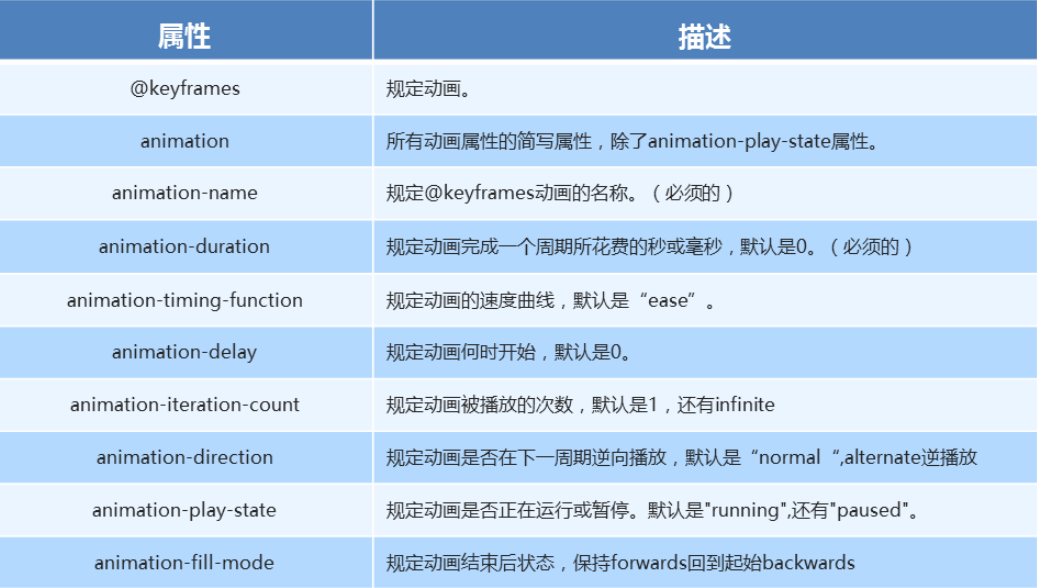
常见的属性
代码演示
xxxxxxxxxxdiv {width: 100px;height: 100px;background-color: aquamarine;/* 动画名称 */animation-name: move;/* 动画花费时长 */animation-duration: 2s;/* 动画速度曲线 */animation-timing-function: ease-in-out;/* 动画等待多长时间执行 */animation-delay: 2s;/* 规定动画播放次数 infinite: 无限循环 */animation-iteration-count: infinite;/* 是否逆行播放 */animation-direction: alternate;/* 动画结束之后的状态 */animation-fill-mode: forwards;}div:hover {/* 规定动画是否暂停或者播放 */animation-play-state: paused;}
十一、 动画简写方式
动画简写方式
xxxxxxxxxx/* animation: 动画名称 持续时间 运动曲线 何时开始 播放次数 是否反方向 起始与结束状态 */animation: name duration timing-function delay iteration-count direction fill-mode知识要点
- 简写属性里面不包含
animation-paly-state - 暂停动画
animation-paly-state: paused; 经常和鼠标经过等其他配合使用 - 要想动画走回来,而不是直接调回来:
animation-direction: alternate - 盒子动画结束后,停在结束位置:
animation-fill-mode: forwards
- 简写属性里面不包含
代码演示
xxxxxxxxxxanimation: move 2s linear 1s infinite alternate forwards;
十二、速度曲线细节
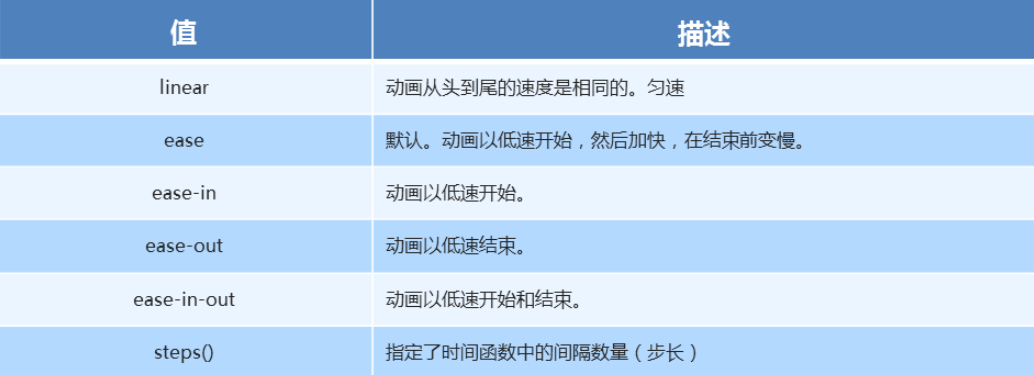
速度曲线细节
animation-timing-function: 规定动画的速度曲线,默认是ease
代码演示
xxxxxxxxxxdiv {width: 0px;height: 50px;line-height: 50px;white-space: nowrap;overflow: hidden;background-color: aquamarine;animation: move 4s steps(24) forwards;}@keyframes move {0% {width: 0px;}100% {width: 480px;}}
十三、奔跑的熊大
- 代码演示
xxxxxxxxxx<html lang="en"><head> <meta charset="UTF-8"> <meta name="viewport" content="width=device-width, initial-scale=1.0"> <meta http-equiv="X-UA-Compatible" content="ie=edge"> <title>Document</title> <style> body { background-color: #ccc; } div { position: absolute; width: 200px; height: 100px; background: url(media/bear.png) no-repeat; /* 我们元素可以添加多个动画, 用逗号分隔 */ animation: bear .4s steps(8) infinite, move 3s forwards; } @keyframes bear { 0% { background-position: 0 0; } 100% { background-position: -1600px 0; } } @keyframes move { 0% { left: 0; } 100% { left: 50%; /* margin-left: -100px; */ transform: translateX(-50%); } } </style></head><body> <div></div></body></html>