JavaScript高级第02天笔记
1.构造函数和原型
1.1对象的三种创建方式--复习
字面量方式
var obj = {};new关键字
xxxxxxxxxxvar obj = new Object();构造函数方式
xxxxxxxxxxfunction Person(name,age){this.name = name;this.age = age;}var obj = new Person('zs',12);
1.2静态成员和实例成员
1.2.1实例成员
实例成员就是构造函数内部通过this添加的成员 如下列代码中uname age sing 就是实例成员,实例成员只能通过实例化的对象来访问
xxxxxxxxxx function Star(uname, age) { this.uname = uname; this.age = age; this.sing = function() { console.log('我会唱歌'); }}var ldh = new Star('刘德华', 18);console.log(ldh.uname);//实例成员只能通过实例化的对象来访问1.2.2静态成员
静态成员 在构造函数本身上添加的成员 如下列代码中 sex 就是静态成员,静态成员只能通过构造函数来访问
xxxxxxxxxx function Star(uname, age) { this.uname = uname; this.age = age; this.sing = function() { console.log('我会唱歌'); }}Star.sex = '男';var ldh = new Star('刘德华', 18);console.log(Star.sex);//静态成员只能通过构造函数来访问1.3构造函数的问题
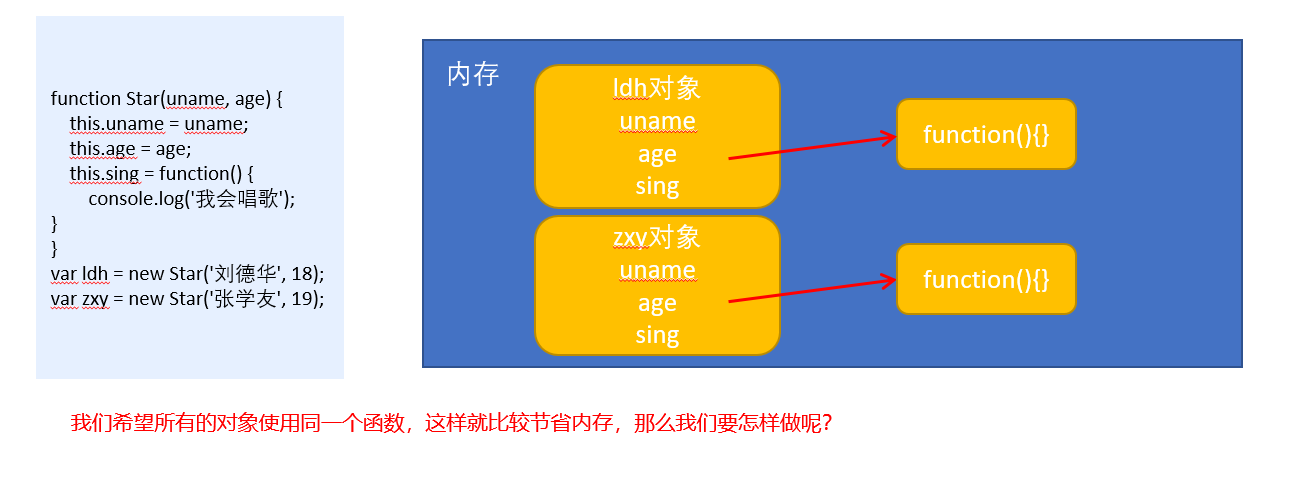
构造函数方法很好用,但是存在浪费内存的问题。
1.4构造函数原型prototype
构造函数通过原型分配的函数是所有对象所共享的。
JavaScript 规定,每一个构造函数都有一个prototype 属性,指向另一个对象。注意这个prototype就是一个对象,这个对象的所有属性和方法,都会被构造函数所拥有。
我们可以把那些不变的方法,直接定义在 prototype 对象上,这样所有对象的实例就可以共享这些方法。
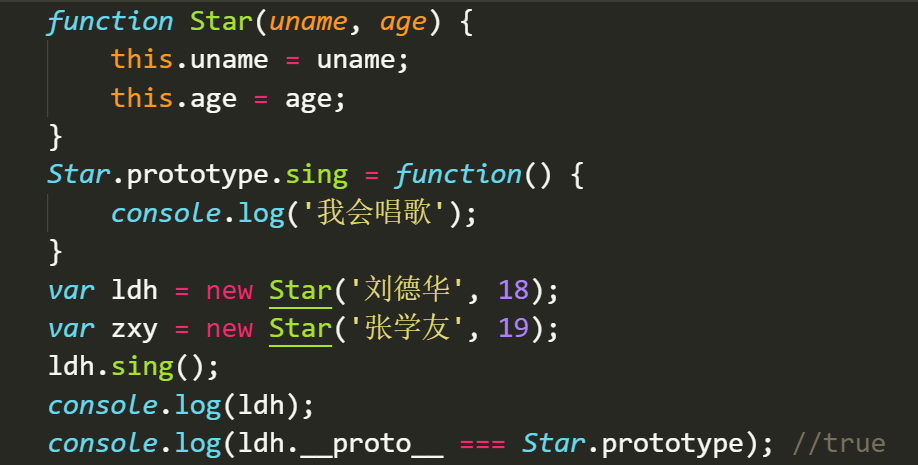
xxxxxxxxxxfunction Star(uname, age) { this.uname = uname; this.age = age;}Star.prototype.sing = function() { console.log('我会唱歌');}var ldh = new Star('刘德华', 18);var zxy = new Star('张学友', 19);ldh.sing();//我会唱歌zxy.sing();//我会唱歌
1.5对象原型
xxxxxxxxxx对象都会有一个属性 __proto__ 指向构造函数的 prototype 原型对象,之所以我们对象可以使用构造函数 prototype 原型对象的属性和方法,就是因为对象有 __proto__ 原型的存在。__proto__对象原型和原型对象 prototype 是等价的__proto__对象原型的意义就在于为对象的查找机制提供一个方向,或者说一条路线,但是它是一个非标准属性,因此实际开发中,不可以使用这个属性,它只是内部指向原型对象 prototype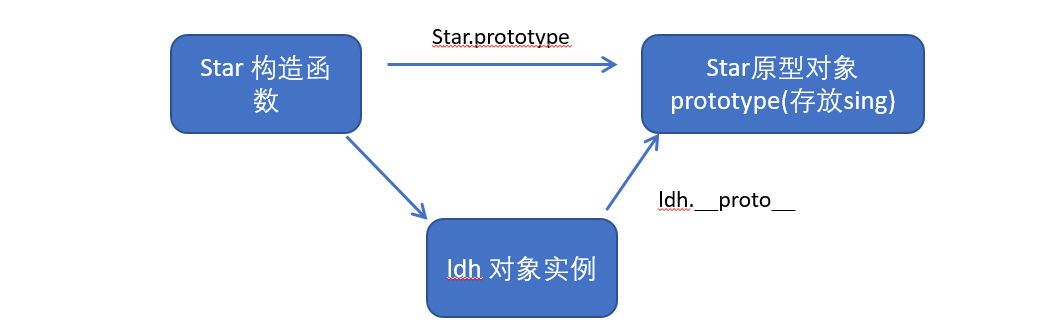
1.6constructor构造函数
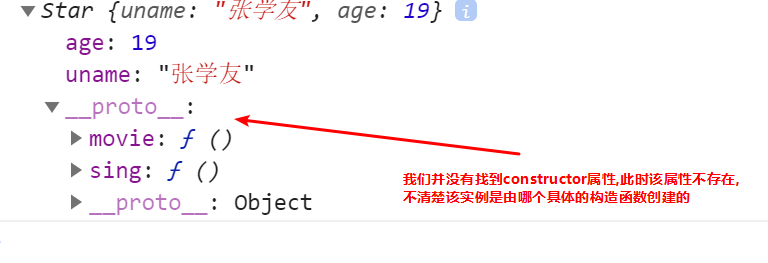
xxxxxxxxxx对象原型( __proto__)和构造函数(prototype)原型对象里面都有一个属性 constructor 属性 ,constructor 我们称为构造函数,因为它指回构造函数本身。constructor 主要用于记录该对象引用于哪个构造函数,它可以让原型对象重新指向原来的构造函数。一般情况下,对象的方法都在构造函数的原型对象中设置。如果有多个对象的方法,我们可以给原型对象采取对象形式赋值,但是这样就会覆盖构造函数原型对象原来的内容,这样修改后的原型对象 constructor 就不再指向当前构造函数了。此时,我们可以在修改后的原型对象中,添加一个 constructor 指向原来的构造函数。如果我们修改了原来的原型对象,给原型对象赋值的是一个对象,则必须手动的利用constructor指回原来的构造函数如:
xxxxxxxxxx function Star(uname, age) { this.uname = uname; this.age = age; } // 很多情况下,我们需要手动的利用constructor 这个属性指回 原来的构造函数 Star.prototype = { // 如果我们修改了原来的原型对象,给原型对象赋值的是一个对象,则必须手动的利用constructor指回原来的构造函数 constructor: Star, // 手动设置指回原来的构造函数 sing: function() { console.log('我会唱歌'); }, movie: function() { console.log('我会演电影'); }}var zxy = new Star('张学友', 19);console.log(zxy)以上代码运行结果,设置constructor属性如图:
 如果未设置constructor属性,如图:
1.7原型链
每一个实例对象又有一个proto属性,指向的构造函数的原型对象,构造函数的原型对象也是一个对象,也有proto属性,这样一层一层往上找就形成了原型链。
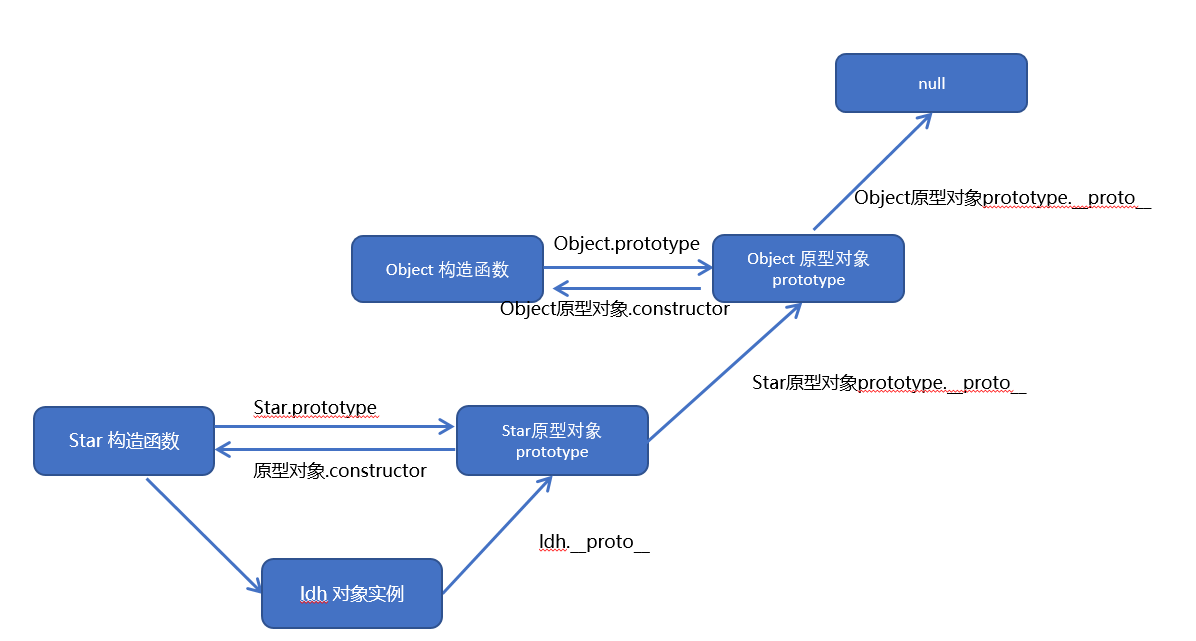
1.8构造函数实例和原型对象三角关系
xxxxxxxxxx1.构造函数的prototype属性指向了构造函数原型对象2.实例对象是由构造函数创建的,实例对象的__proto__属性指向了构造函数的原型对象3.构造函数的原型对象的constructor属性指向了构造函数,实例对象的原型的constructor属性也指向了构造函数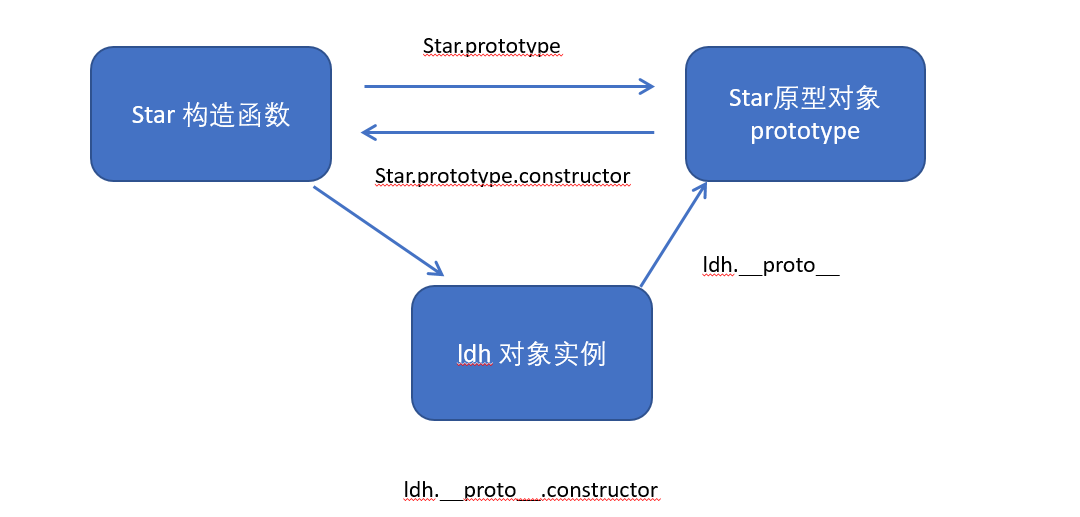
1.9原型链和成员的查找机制
任何对象都有原型对象,也就是prototype属性,任何原型对象也是一个对象,该对象就有proto属性,这样一层一层往上找,就形成了一条链,我们称此为原型链;
xxxxxxxxxx当访问一个对象的属性(包括方法)时,首先查找这个对象自身有没有该属性。如果没有就查找它的原型(也就是 __proto__指向的 prototype 原型对象)。如果还没有就查找原型对象的原型(Object的原型对象)。依此类推一直找到 Object 为止(null)。__proto__对象原型的意义就在于为对象成员查找机制提供一个方向,或者说一条路线。1.10原型对象中this指向
构造函数中的this和原型对象的this,都指向我们new出来的实例对象
xxxxxxxxxxfunction Star(uname, age) { this.uname = uname; this.age = age;}var that;Star.prototype.sing = function() { console.log('我会唱歌'); that = this;}var ldh = new Star('刘德华', 18);// 1. 在构造函数中,里面this指向的是对象实例 ldhconsole.log(that === ldh);//true// 2.原型对象函数里面的this 指向的是 实例对象 ldh
1.11通过原型为数组扩展内置方法
xxxxxxxxxx Array.prototype.sum = function() { var sum = 0; for (var i = 0; i < this.length; i++) { sum += this[i]; } return sum; }; //此时数组对象中已经存在sum()方法了 可以始终 数组.sum()进行数据的求2.继承
2.1call()
- call()可以调用函数
- call()可以修改this的指向,使用call()的时候 参数一是修改后的this指向,参数2,参数3..使用逗号隔开连接
xxxxxxxxxx function fn(x, y) { console.log(this); console.log(x + y);} var o = { name: 'andy' }; fn.call(o, 1, 2);//调用了函数此时的this指向了对象o,
2.2子构造函数继承父构造函数中的属性
- 先定义一个父构造函数
- 再定义一个子构造函数
- 子构造函数继承父构造函数的属性(使用call方法)
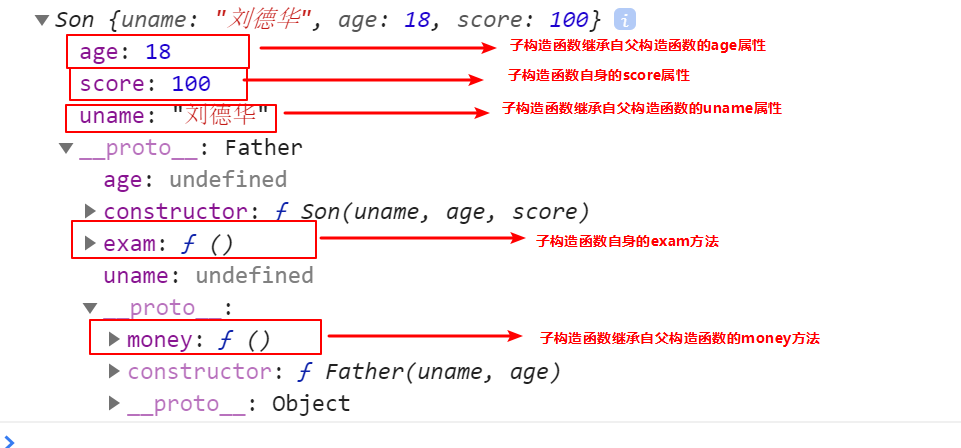
xxxxxxxxxx // 1. 父构造函数 function Father(uname, age) { // this 指向父构造函数的对象实例 this.uname = uname; this.age = age; } // 2 .子构造函数 function Son(uname, age, score) { // this 指向子构造函数的对象实例 3.使用call方式实现子继承父的属性 Father.call(this, uname, age); this.score = score;}var son = new Son('刘德华', 18, 100);console.log(son);
2.3借用原型对象继承方法
- 先定义一个父构造函数
- 再定义一个子构造函数
- 子构造函数继承父构造函数的属性(使用call方法)
x// 1. 父构造函数function Father(uname, age) { // this 指向父构造函数的对象实例 this.uname = uname; this.age = age;}Father.prototype.money = function() { console.log(100000); }; // 2 .子构造函数 function Son(uname, age, score) { // this 指向子构造函数的对象实例 Father.call(this, uname, age); this.score = score; }// Son.prototype = Father.prototype; 这样直接赋值会有问题,如果修改了子原型对象,父原型对象也会跟着一起变化 Son.prototype = new Father(); // 如果利用对象的形式修改了原型对象,别忘了利用constructor 指回原来的构造函数 Son.prototype.constructor = Son; // 这个是子构造函数专门的方法 Son.prototype.exam = function() { console.log('孩子要考试'); } var son = new Son('刘德华', 18, 100); console.log(son);如上代码结果如图:
3.ES5新增方法
3.1数组方法forEach遍历数组
xxxxxxxxxx arr.forEach(function(value, index, array) { //参数一是:数组元素 //参数二是:数组元素的索引 //参数三是:当前的数组 }) //相当于数组遍历的 for循环 没有返回值3.2数组方法filter过滤数组
xxxxxxxxxx var arr = [12, 66, 4, 88, 3, 7]; var newArr = arr.filter(function(value, index,array) { //参数一是:数组元素 //参数二是:数组元素的索引 //参数三是:当前的数组 return value >= 20; }); console.log(newArr);//[66,88] //返回值是一个新数组3.3数组方法some
xxxxxxxxxxsome 查找数组中是否有满足条件的元素 var arr = [10, 30, 4]; var flag = arr.some(function(value,index,array) { //参数一是:数组元素 //参数二是:数组元素的索引 //参数三是:当前的数组 return value < 3; });console.log(flag);//false返回值是布尔值,只要查找到满足条件的一个元素就立马终止循环3.4筛选商品案例
定义数组对象数据
xxxxxxxxxxvar data = [{id: 1,pname: '小米',price: 3999}, {id: 2,pname: 'oppo',price: 999}, {id: 3,pname: '荣耀',price: 1299}, {id: 4,pname: '华为',price: 1999}, ];使用forEach遍历数据并渲染到页面中
xxxxxxxxxxdata.forEach(function(value) {var tr = document.createElement('tr');tr.innerHTML = '<td>' + value.id + '</td><td>' + value.pname + '</td><td>' + value.price + '</td>';tbody.appendChild(tr);});根据价格筛选数据
获取到搜索按钮并为其绑定点击事件
xxxxxxxxxxsearch_price.addEventListener('click', function() {});使用filter将用户输入的价格信息筛选出来
xxxxxxxxxxsearch_price.addEventListener('click', function() {var newDate = data.filter(function(value) {//start.value是开始区间//end.value是结束的区间return value.price >= start.value && value.price <= end.value;});console.log(newDate);});将筛选出来的数据重新渲染到表格中
将渲染数据的逻辑封装到一个函数中
xxxxxxxxxxfunction setDate(mydata) {// 先清空原来tbody 里面的数据tbody.innerHTML = '';mydata.forEach(function(value) {var tr = document.createElement('tr');tr.innerHTML = '<td>' + value.id + '</td><td>' + value.pname + '</td><td>' + value.price + '</td>';tbody.appendChild(tr);});}将筛选之后的数据重新渲染
xxxxxxxxxxsearch_price.addEventListener('click', function() {var newDate = data.filter(function(value) {return value.price >= start.value && value.price <= end.value;});console.log(newDate);// 把筛选完之后的对象渲染到页面中setDate(newDate);});
根据商品名称筛选
获取用户输入的商品名称
为查询按钮绑定点击事件,将输入的商品名称与这个数据进行筛选
xxxxxxxxxxsearch_pro.addEventListener('click', function() {var arr = [];data.some(function(value) {if (value.pname === product.value) {// console.log(value);arr.push(value);return true; // return 后面必须写true}});// 把拿到的数据渲染到页面中setDate(arr);})
3.5some和forEach区别
- 如果查询数组中唯一的元素, 用some方法更合适,在some 里面 遇到 return true 就是终止遍历 迭代效率更高
- 在forEach 里面 return 不会终止迭代
3.6trim方法去除字符串两端的空格
xxxxxxxxxxvar str = ' hello 'console.log(str.trim()) //hello 去除两端空格var str1 = ' he l l o 'console.log(str.trim()) //he l l o 去除两端空格3.7获取对象的属性名
Object.keys(对象) 获取到当前对象中的属性名 ,返回值是一个数组
xxxxxxxxxx var obj = { id: 1, pname: '小米', price: 1999, num: 2000};var result = Object.keys(obj)console.log(result)//[id,pname,price,num]3.8Object.defineProperty
Object.defineProperty设置或修改对象中的属性
xxxxxxxxxxObject.defineProperty(对象,修改或新增的属性名,{ value:修改或新增的属性的值, writable:true/false,//如果值为false 不允许修改这个属性值 enumerable: false,//enumerable 如果值为false 则不允许遍历 configurable: false //configurable 如果为false 则不允许删除这个属性 属性是否可以被删除或是否可以再次修改特性})